

PL-200 exam questions for practice in 2023 Updated 212 Questions
Updated Sep-2023 Premium PL-200 Exam Engine pdf - Download Free Updated 212 Questions
Microsoft PL-200 exam, also known as the Microsoft Power Platform Functional Consultant exam, is a certification exam that is designed for individuals who want to demonstrate their expertise in using the Microsoft Power Platform to solve business problems. PL-200 exam measures the candidate's ability to create and configure Power Platform solutions, including Power Apps, Power Automate, Power BI, and Power Virtual Agents. Passing PL-200 exam validates the candidate's skills in developing custom applications, automating workflows, and analyzing data using the Power Platform.
Integrating Power Apps with Other Services and Apps
This is the last topic that candidates must cover when preparing for PL-200 exam. It confirms if one has the skills related to integrating Power BI with Power Apps, implementing the AI builder, and integrating the Power Apps with Microsoft 365. Here, one should demonstrate the ability to filter data, publish dashboards and reports, test and train models, perform the configuration of the app policies, and others.
NEW QUESTION # 57
You configure an alert in Power Bl.
You need to alert users when the value of a tile exceeds a threshold. To answer, select the appropriate options in the answer area.
NOTE: Each correct selection is worth one point.
Answer:
Explanation:
Explanation
Reference:
https://docs.microsoft.com/en-us/power-bi/create-reports/service-set-data-alerts
NEW QUESTION # 58
You create a Power Virtual Agents chatbot to reduce the number of incoming support calls that require a live person.
The chatbot does not direct users to the correct information. You determine that this is because the chatbot is not able to identify which product a user is referring to in a conversation.
You need to present a list of products so that users can select the correct product.
What should you create?
- A. Slot filling
- B. Entity
- C. Variable
Answer: B
Explanation:
Explanation
Slot filling is a natural language understanding concept that means saving an extracted entity to an object.
However, in Power Virtual Agents, slot filling means placing the extracted entity value into a variable.
Reference: https://docs.microsoft.com/en-us/power-virtual-agents/advanced-entities-slot-filling
NEW QUESTION # 59
You are creating a new business process flow to qualify leads.
You create an action. The action is not available inside the Action Step.
You need to make the action available to the Action Step.
Which two steps must you perform? Each correct answer presents part of the solution.
NOTE Each correct selection is worth one point.
- A. Ensure that the entity for the action matches the corresponding entity for the business process flow stage.
- B. Select Run as an on-demand process
- C. Activate the action.
- D. Add at least one step to the action.
Answer: A,D
Explanation:
Reference:
https://docs.microsoft.com/en-us/business-applications-release-notes/april18/microsoft-flow/add-action-business
NEW QUESTION # 60
You are a Dynamics 365 Customer Service help desk administrator.
Cases entered in forms require different types of data to be stored in different types of fields.
You need to create forms for each of the following case types:
Which form types should you create? To answer, drag the appropriate form types to the meet the data entry requirements. Each source may be used once, more than once, or not at all. You may need to drag the split bar between panes or scroll to view content.
NOTE: Each correct selection is worth one point.
Answer:
Explanation:
Explanation
Reference:
https://docs.microsoft.com/en-us/dynamics365/customer-service/create-design-forms-customer-service-hub
NEW QUESTION # 61
You are designing a canvas app that connects to Common Data Service.
You need to configure the app to meet the requirements and ensure that the canvas app is available offline.
What should you implement? To answer, select the appropriate options in the answer area.
NOTE: Each correct selection is worth one point.
Answer:
Explanation:
Explanation
Reference:
https://docs.microsoft.com/en-us/powerapps/maker/canvas-apps/offline-apps
NEW QUESTION # 62
You are designing a chatbot for a sports outlet.
You need to complete the chatbot.
Which features should you use? To answer, drag the appropriate features to the correct requirements. Each feature may be used once, more than once, or not at all. You may need to drag the split bar between panes or scroll to view content.
NOTE Each correct selection is worth one point.
Answer:
Explanation:
Explanation
Graphical user interface, text, application, email Description automatically generated
Box 1: Entities
Out of the box, Power Virtual Agents comes with a set of prebuilt entities, which represent the most commonly used stereotype information in real-world dialogs, such as age, colors, numbers, and names.
With the knowledge granted by entities, a bot can smartly recognize the relevant information from a user input and save it for later use.
Box 2: Topics
In Power Virtual Agents, a topic defines a how a bot conversation plays out.
You can author topics by customizing provided templates, create new topics from scratch, or get suggestions from existing help sites.
A topic has trigger phrases - these are phrases, keywords, or questions that a user is likely to type that is related to a specific issue - and conversation nodes - these are what you use to define how a bot should respond and what it should do.
Box 3: Variables
Variables let you save responses from your customers in a conversation with your bot so that you can reuse them later in the conversation.
For example, you can save a customer's name in a variable called UserName. The bot can then address the customer by name as the conversation continues.
You can use variables to create logical expressions that dynamically route the customer down different conversation paths.
Reference:
https://docs.microsoft.com/en-us/power-virtual-agents/advanced-entities-slot-filling
https://docs.microsoft.com/en-us/power-virtual-agents/authoring-create-edit-topics
https://docs.microsoft.com/en-us/power-virtual-agents/advanced-flow
https://docs.microsoft.com/en-us/power-virtual-agents/authoring-variables
NEW QUESTION # 63
You manage the Dynamics 365 environment for a company.
You need to ensure that there are no leads for a customer before you create a new opportunity for the customer.
How can you use duplicate detection rules to achieve this goal? To answer, select the appropriate options in the answer area.
NOTE: Each correct selection is worth one point.
Answer:
Explanation:
NEW QUESTION # 64
You are using power Automate to create a list of customers from a Microsoft Excel file, The list must contain customers who meet one of the following criteria:
* Sales of less than $500,000.
* Customers who are on credit hold.
You need to create a condition to filter the list Of customers.
How should you complete the filter condition? To answer, select the appropriate options in the answer area.
NOTE: Each correct selection is worth one point
Answer:
Explanation:
Explanation
Graphical user interface, application, Word Description automatically generated
Box 1: or
Or: Takes two arguments and returns true if either argument is true.
Box 2: equals(item()?['credithold'],'true')
Equals: Returns true if two values are equal.
For example, if parameter1 is someValue, this expression returns true:
equals(parameters('parameter1'), 'someValue')
Reference:
https://docs.microsoft.com/en-us/power-automate/use-expressions-in-conditions
NEW QUESTION # 65
A customer tracks events by using a custom entity.
The custom entity includes a custom field for the venue of the events. The customer must be able to display the events by venue in a calendar.
You need to ensure that all events display by venue in the calendar.
To which component should you add a control?
- A. Chart
- B. Field
- C. view
- D. Form
Answer: C
Explanation:
If you use unified interface, you can display any record in a calendar view via the calendar control.
Go to Settings->Customization->Customize the System
Open the configuration for the entity that you want to use the calendar control (Opportunities in our example) Click the View tab Click "Add Control" and select the calendar control.
Click the dot for every interface from which you want the calendar control to be available.
Reference:
https://crmtipoftheday.com/1206/view-any-dynamics-365-record-on-a-calendar/
NEW QUESTION # 66
Note: This question is part of a series of questions that present the same scenario. Each question in the series contains a unique solution that might meet the stated goals. Some question sets might have more than one correct solution, while others might not have a correct solution.
After you answer a question in this section, you will NOT be able to return to it. As a result, these questions will not appear in the review screen.
You are creating Power Virtual Agents chatbot that captures demographic information about customers.
The chatbot must determine the group a customer belongs to based on their age. The age groups are:
* 0 - 17
* 18 - 25
* 26 - 35
* 36 - 55
* 55 - 100
You need to configure the chatbot to ask a question that can be used to determine the correct age group.
Solution: Use age for Identify in the question and then add branches for each group that use conditional logic.
Does this meet the goal?
- A. No
- B. Yes
Answer: A
Explanation:
Explanation
Instead, create a custom Age group entity and synonyms for each individual age in the corresponding item.
Use Age group for Identify in the question.
The prebuilt entities cover commonly used information types, but on some occasions, such as when building a bot that serves a specific purpose, you'll need to teach the bot's language understanding model some domain-specific knowledge.
To do this, you need to create a custom entity.
Reference:
https://docs.microsoft.com/en-us/power-virtual-agents/advanced-entities-slot-filling
NEW QUESTION # 67
A company creates a Microsoft Power Apps app through the Power Apps designer portal for use in Microsoft Teams.
This app needs to be promoted to the user acceptance testing environment.
You need to complete the Microsoft recommended actions before you export the solution.
Which two actions should you complete? Each correct answer presents part of the solution.
NOTE: Each correct selection is worth one point.
- A. Clone a solution.
- B. Set the Optimized embedding appearance field to true.
- C. Write validation tests.
- D. Publish all changes.
- E. Run the solution checker.
Answer: A,E
Explanation:
Explanation
The Power Apps solution checker performs a rich static analysis check on your solutions against a set of best practice rules to quickly identify problematic patterns. After the check completes, you receive a detailed report that lists the issues identified, the components and code affected, and links to documentation that describes how to resolve each issue.
The solution checker analyzes these solution components:
Common Data Service plug-ins
Common Data Service custom workflow activities
Common Data Service web resources (HTML and JavaScript)
Common Data Service configurations, such as SDK message steps
Reference: https://www.eimagine.com/ui/
NEW QUESTION # 68
You create a new independent software vendor (ISV) solution for a Power Apps app.
The Power Apps solution will be imported into multiple customer environments. The environments will have a large variety of solutions and publishers.
You need to avoid naming conflicts during solution import.
Which element should you configure?
- A. Package type
- B. Marketplace
- C. Prefix
- D. Configuration page
- E. Version
Answer: C
Explanation:
Explanation
A solution publisher includes a prefix. The publisher prefix is a mechanism to help avoid naming collisions.
This allows for solutions from different publishers to be installed in an environment with few conflicts. For example, the Contoso solution displayed here includes a solution publisher prefix of contoso.
Reference: https://docs.microsoft.com/en-us/power-platform/alm/solution-concepts-alm
NEW QUESTION # 69
A company is creating a canvas app and a model-driven app to manage their customer accounts.
The canvas app requires a business rule to set the Business Type column to large if the customer size is greater than a specific currency value.
The model-driven app requires a business rule to recommend the account rating be re-evaluated when the account goes on credit hold for this app only.
You need to configure the scope for the business rules.
Which scope should you use? To answer, drag the appropriate scopes to the correct business rules. Each scope may be used once, more than once, or not at all. You may need to drag the split bar between panes or scroll to view content.
NOTE: Each correct selection is worth one point.
Answer:
Explanation:
Explanation
Box 1: Table
The canvas app requires a business rule to set the Business Type column to large if the customer size is greater than a specific currency value.
Scope the business rule to Entity (Table).
Box 2: Specific form
The model-driven app requires a business rule to recommend the account rating be re-evaluated when the account goes on credit hold for this app only.
For Model
The scope of the business rule determines which forms the business rule will be applied. You set the scope, according to the following:
If you select this item...
The scope is set to...
Entity- The table and all forms for the table
All Forms- All forms for the table
Specific form (account Main Form, for example) - Just that form
Reference: https://debajmecrm.com/business-rules-in-powerapps-canvas-apps/
https://docs.microsoft.com/en-us/power-apps/maker/model-driven-apps/create-business-rules-recommendations-
NEW QUESTION # 70
You are a Dynamics 365 for Customer Service developer.
You must trigger a mobile notification whenever a specific hashtag is posted from Twitter. The notification will send email to the company's social media teams distribution list.
You need to create a connection to the Twitter service and build a solution.
Which four actions should you perform in sequence? To answer, move the appropriate actions from the list of actions to the answer area and arrange them in the correct order.
Answer:
Explanation:
Explanation
NEW QUESTION # 71
You create workflows to automate business processes.
You need to create a workflow that automatically sends emails based on a mail merge template. The workflow must contain the following configurations:
* Run immediately.
* Validate when a condition is met.
* Perform an action when a condition is met.
To answer, select the appropriate configuration in the answer area.
NOTE: Each correct selection is worth one point.
Answer:
Explanation:
Explanation
Graphical user interface, text, application, email Description automatically generated
NEW QUESTION # 72
A company is planning to create a Power Virtual Agents bot.
The bot has the following requirements:
* The bot must provide address information for the company.
* The bot must be available from Microsoft Teams and from the internet website of the company.
You need to configure the bot. Which component should you use?
- A. Composer
- B. Skill
- C. Channel
- D. Template
Answer: C
Explanation:
Explanation
To make the bot available from Microsoft Teams and from the company's internet website, you need to configure the channels for the bot. Power Virtual Agents uses channels to connect the bot to different communication platforms such as Microsoft Teams, Skype, Facebook, and more. By configuring the appropriate channels for the bot, you can make it available on those platforms and allow users to interact with the bot from those locations.
You can configure channels by going to the Power Virtual Agents portal, and then select the bot you want to configure. Then select the "Channels" tab, where you can add the channels which you want the bot to be available on.
Reference: https://docs.microsoft.com/en-us/power-virtual-agents/channels-overview
NEW QUESTION # 73
A company has a Power Apps app.
The app must meet the following requirements:
* Managers assign lead records to the sales department. A new phone call record must be created if a lead record has no activities.
* An email must be sent to the manager if the phone call record created is not completed after one day.
A classic workflow must run when a lead record is assigned.
You need to configure the check conditions for the workflow.
NOTE: Each correct selection is worth one point.
Answer:
Explanation: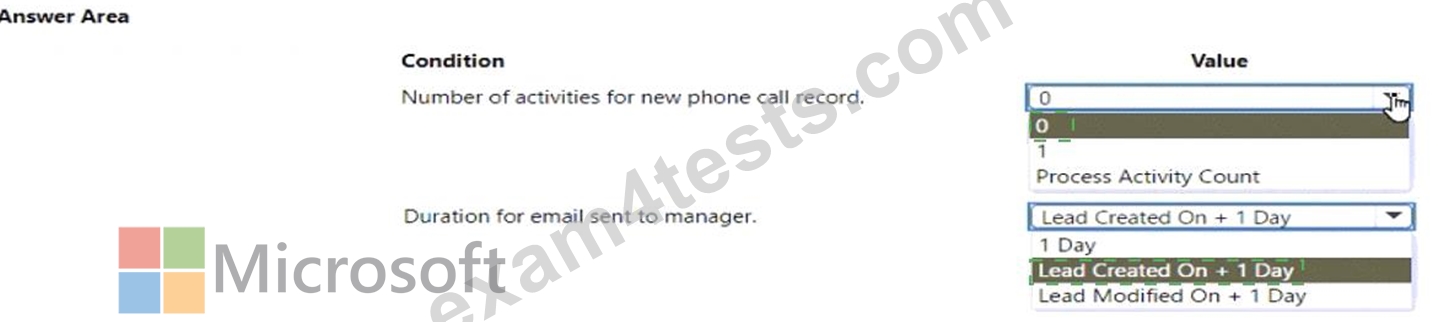
Explanation
NEW QUESTION # 74
You create a report by using Power Bl Desktop and publish the report to the Power Bl service. You enable Power Bl visualization embedding in a model-driven app.
You need to configure the model-driven app to display a Power Bi tile
Which four actions should you perform in sequence? To answer, move the appropriate actions from the list of actions to the answer area and arrange them in the correct order.
Answer:
Explanation:
Explanation
Text Description automatically generated
Step 1: Create a personal dashboard in the model-driven app
Add a Power BI dashboard to your model-driven app.
Step 2: Add a Power BI tile to the dashboard and select the Power BI dashboard in the app.
Add one Power BI tiles to your personal dashboard.
Step 3: Share the dashboard with the appropriate user in the app
Share the personal dashboard that contains Power BI visualizations: you must configure sharing in both Dataverse and Power BI, and the user or group must have the same credentials and appropriate level of access in both services. To share your personal dashboard in your app go to, Dashboards. In the list of dashboards, select the personal dashboard you want, and then select SHARE DASHBOARD.
Reference:
https://docs.microsoft.com/en-us/powerapps/user/add-powerbi-dashboards
NEW QUESTION # 75
You are examining several processes to determine if you can automate the processes by using Power Automate.
The processes must run without human intervention when possible.
You need to determine which flow type should be used for each process.
Which flow type should you use? To answer, drag the appropriate processes to the correct flow types. Each process may be used once, more than once, or not at all. You may need to drag the split bar between panes or scroll to view content.
NOTE: Each correct selection is worth one point.
Answer:
Explanation:
References:
https://docs.microsoft.com/en-us/learn/modules/pad-web/1-introduction
https://docs.microsoft.com/en-us/power-automate/desktop-flows/run-pad-flow
NEW QUESTION # 76
You need to design the guest check-in solution.
Which technologies should you use? To answer, select the appropriate options in the answer area.
NOTE: Each correct selection is worth one point.
Answer:
Explanation:
NEW QUESTION # 77
You are designing a canvas app that connects to Common Data Service.
You need to configure the app to meet the requirements and ensure that the canvas app is available offline.
What should you implement? To answer, select the appropriate options in the answer area.
NOTE: Each correct selection is worth one point.
Answer:
Explanation:
Reference:
https://docs.microsoft.com/en-us/powerapps/maker/canvas-apps/offline-apps
NEW QUESTION # 78
You manage the Dynamics 365 environment for a company.
You need to ensure that there are no leads for a customer before you create a new opportunity for the customer.
How can you use duplicate detection rules to achieve this goal? To answer, select the appropriate options in the answer area.
NOTE: Each correct selection is worth one point.
Answer:
Explanation:
NEW QUESTION # 79
A company is creating a canvas app and a model-driven app to manage their customer accounts.
The canvas app requires a business rule to set the Business Type column to large if the customer size is greater than a specific currency value.
The model-driven app requires a business rule to recommend the account rating be re-evaluated when the account goes on credit hold for this app only.
You need to configure the scope for the business rules.
Which scope should you use? To answer, drag the appropriate scopes to the correct business rules. Each scope may be used once, more than once, or not at all. You may need to drag the split bar between panes or scroll to view content.
NOTE: Each correct selection is worth one point.
Answer:
Explanation:
Explanation
Box 1: Table
The canvas app requires a business rule to set the Business Type column to large if the customer size is greater than a specific currency value.
Scope the business rule to Entity (Table).
Box 2: Specific form
The model-driven app requires a business rule to recommend the account rating be re-evaluated when the account goes on credit hold for this app only.
For Model
The scope of the business rule determines which forms the business rule will be applied. You set the scope, according to the following:
If you select this item...
The scope is set to...
Entity- The table and all forms for the table
All Forms- All forms for the table
Specific form (account Main Form, for example) - Just that form
Reference: https://debajmecrm.com/business-rules-in-powerapps-canvas-apps/
https://docs.microsoft.com/en-us/power-apps/maker/model-driven-apps/create-business-rules-recommendations-
NEW QUESTION # 80
You need to create a system chart for the Account entity.
The chart must display a count of accounts grouped by owner and then display the accounts by Address 1: State/Province for each owner. You begin to configure chart options as shown in the image below.
How should you complete the configuration? To answer, select the appropriate options in the answer area.
NOTE: Each correct selection is worth one point. The chart must display a count of accounts grouped by owner, and then display the accounts by Address 1 to State/Province for each owner.
Answer:
Explanation:
NEW QUESTION # 81
......
Authentic PL-200 Dumps With 100% Passing Rate Practice Tests Dumps: https://torrentpdf.exam4tests.com/PL-200-pdf-braindumps.html